
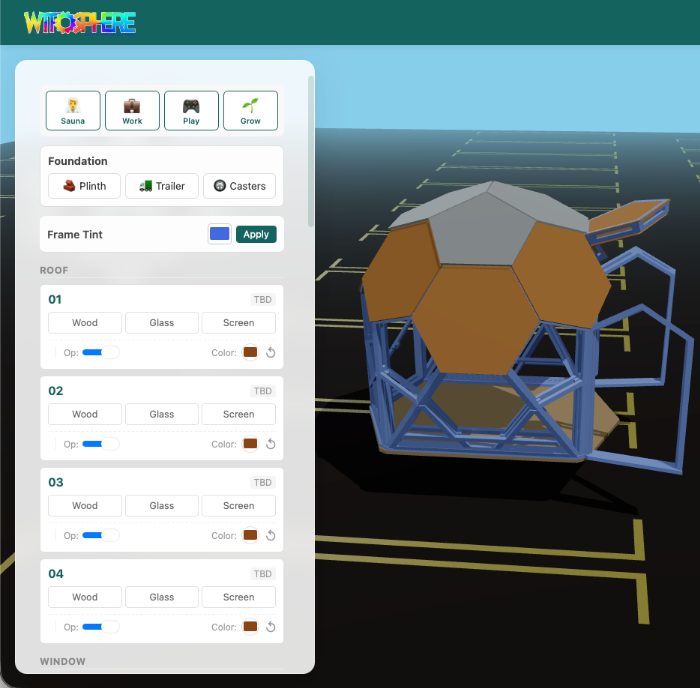
Context: Thios is the product company I founded solo, an open-source modular shelter platform. This post is a technical deep-dive on the 3D configurator I built solo, and what it demonstrates about the collapsing barrier between design and engineering.
Most product configurators are built by teams of 10 engineers using React, Redux, and a year of runway. I built one by myself using Three.js, vanilla JavaScript, and stubbornness, and I am not a software engineer.
I am a product designer. For more than a decade I have designed enterprise software at places like John Deere and FourKites, led design teams, built design systems (the shared component libraries products get assembled from), and obsessed over user research. I know Figma and Onshape. I know HTML and CSS. Before this project, I had never written a production JavaScript application.
The Thios configurator lets you design a modular geodesic structure in 3D, choose materials, generate a bill of materials, and get quotes from local suppliers, all in the browser. It supports 10 languages, runs on mobile, and the entire codebase is about 17,000 lines of JavaScript with zero framework dependencies.
I built it with Claude Code as my technical co-founder.
This is how it works.
The Problem
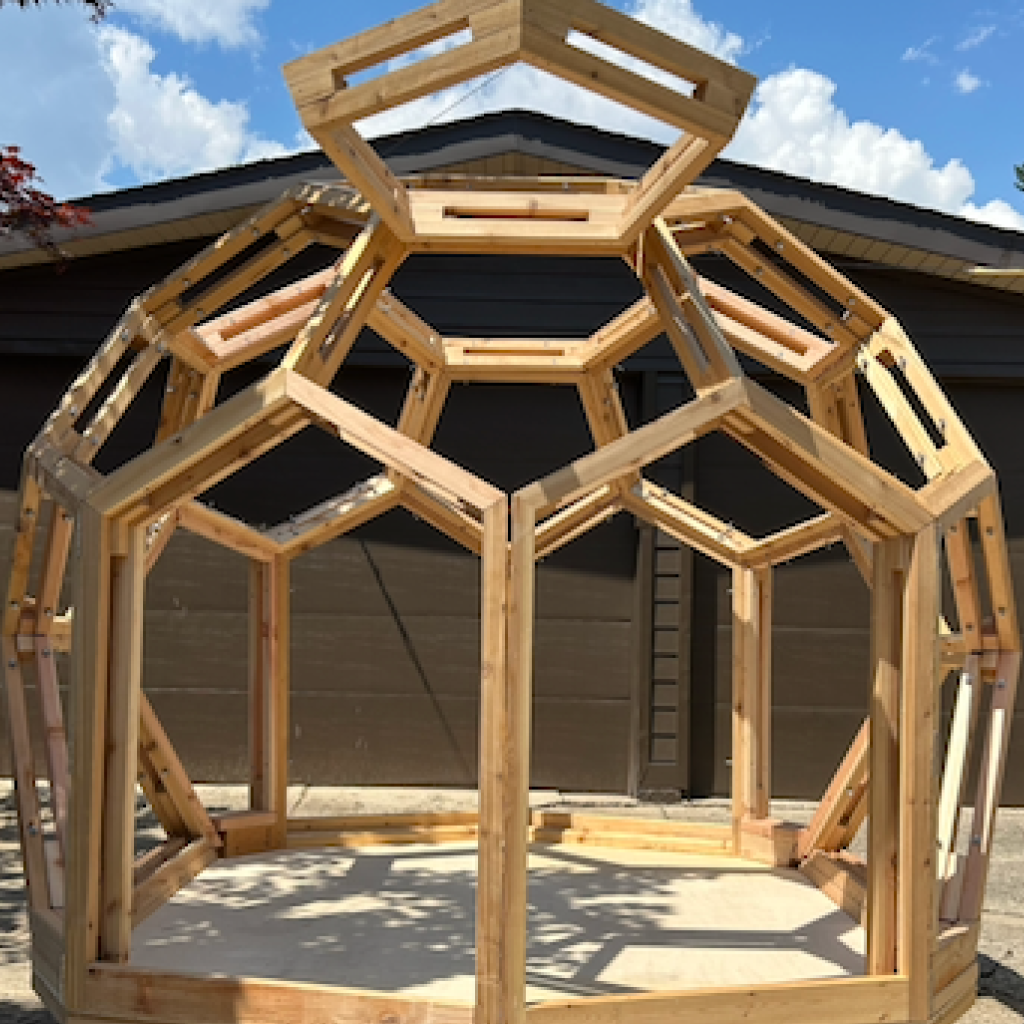
Thios makes modular geodesic shelters. Each structure is a truncated icosahedron, a football shape, built from 23 distinct panel types. Roof panels, wall sections, windows, doors, corners, and structural supports. You mix and match them to create saunas, greenhouses, offices, or whatever else you need.
The problem: how does a customer figure out which panels they need?
A PDF catalog does not work. You need to see how panels fit together in 3D space. You need to rotate the structure, swap materials, add a door where a wall used to be. You need to understand what you are building before you commit to buying $4,000 worth of lumber.
So I built a configurator.
The Stack
Here is the full stack. No surprises, no magic:
- 3D rendering: Three.js r172 (ES modules via CDN)
- Frontend: Vanilla JavaScript. No React. No Vue. No build step. 26 JS files loaded in dependency order.
- Backend: PHP 8 with PDO (MySQL). The same stack as the rest of the site.
- 3D models: GLB format (GLTF 2.0) with Draco compression. 23 panel types, each 5-15 MB uncompressed, 60-900 KB compressed.
- Environment: 7 HDRI environment maps for realistic lighting.
- CAD integration: Onshape REST API for live bill-of-materials data.
- i18n: Custom translation system, 339 keys across 10 languages.
I chose vanilla JS deliberately. The configurator has complex state (module instances, 3D transforms, undo history, pricing), and I wanted to control all of it without fighting a framework's opinions about reactivity.
Three.js Scene Architecture
The 3D viewport is a standard Three.js setup with a few specific decisions:
OrbitControls for camera. Users expect to click-drag to rotate and scroll to zoom. OrbitControls does this out of the box with auto-rotate on load, so the structure spins slowly when the page first renders, giving you an immediate sense of the 3D model.
OutlinePass for selection. When you hover over a panel, it gets a gold outline glow. This uses Three.js post-processing (EffectComposer + OutlinePass) rather than changing the material itself. Cleaner visually, and the original material stays untouched.
HDRI environments for lighting. Flat lighting makes 3D models look like plastic toys. HDRI maps give you realistic reflections and ambient light. I included 7 presets (studio, courtyard, forest, sunset, etc.), the user can switch between them to see how their structure looks in different contexts.
Draco compression for models. The raw GLB files are too large for web. Draco compresses geometry data (vertices, normals, UVs) dramatically. A panel that is 15 MB raw becomes 60 KB with Draco. The tradeoff is decode time, but the WASM-based Draco decoder handles this in under 100ms.
The Module System
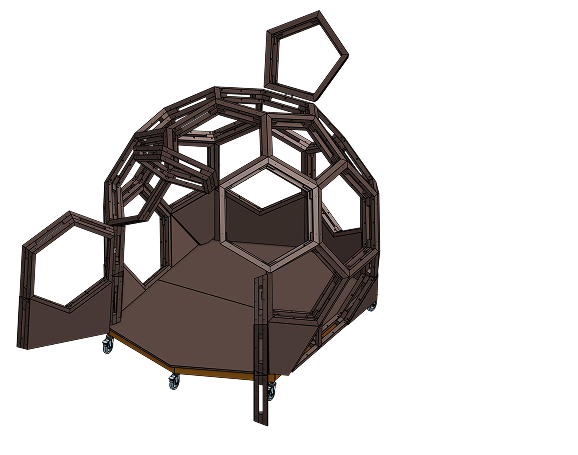
This is the core of the configurator. A Thiosphere is not a single model. It is an assembly of 23 panel types that the user combines.
Each module has a unique ID, a 3D model (GLB file), a category (roof, walls, windows, corners, doors, structure), a price, a maximum quantity, and a set of subparts (the actual lumber cuts, hardware, and materials).
When a user adds a module, the system checks if the GLB is already loaded (clones if yes, loads if not), creates a unique instance ID, positions it in the 3D scene, updates the price calculator, pushes a snapshot to the undo history, and triggers an auto-save to localStorage.
Module instances are tracked in a flat map:
moduleInstances = {
  'module01instance_0': { mesh: THREE.Group, data: {...} },
  'module05instance_2': { mesh: THREE.Group, data: {...} }
}
This flat structure makes serialization trivial. When you save a configuration, I just serialize the instance map, compress it with LZ-String, and encode it as a URL parameter. Sharing a configuration is sharing a URL.
Hex Grid: Multi-Sphere Layouts
A single Thiosphere is useful. But the real power is in multi-sphere configurations, two, three, four, or more structures connected by door panels.
The placement system uses a hexagonal grid with axial coordinates (q, r). Each sphere sits at a hex position, and door panels create passageways between adjacent hexes.
hexDistance(a, b) = (|a.q - b.q| + |a.q + a.r - b.q - b.r| + |a.r - b.r|) / 2
The configurator includes presets for common layouts: single, duo, trio, quad, 7-pack, and 12-pack. Each preset places spheres on the hex grid with appropriate spacing and rotation.
Bill of Materials Generation
This is where software meets physical reality.
Each module is more than a 3D model. It maps to real physical parts. Module 01 (a roof panel) requires specific lumber cuts, fasteners, and sealing materials.
When you click "Generate BOM," the configurator sends your module selections to the API. It aggregates subparts across all selected modules, groups them by material type (timber, hardware, glass, insulation), and returns a complete parts list with costs.
The real trick: Onshape integration. The physical CAD models live in Onshape (a cloud CAD platform with a REST API). The BOM API fetches the latest part data directly from the CAD source, ensuring that if I update a design in Onshape, the configurator reflects the change without manual database updates. Onshape data is cached for 24 hours to avoid API rate limits.
The Consumer-to-Vendor Pipeline
This is the part that makes the configurator more than a 3D toy.
After designing a structure, the user hits "Build Summary." This shows module count, estimated cost, and parts grouped by supplier category. A zip code field finds nearby building suppliers via an OpenStreetMap/Overpass API proxy.
It then creates vendor share tokens, unique URLs that give suppliers read-only access to the parts list for their specific category. A timber yard sees only the lumber cuts. A hardware store sees only the fasteners. A glass supplier sees only the glazing. Nobody sees the full BOM or pricing for other categories.
Each token is a 64-character cryptographically secure string. The vendor opens the URL, sees a clean parts list, and can submit a quote. The entire flow, from 3D design to vendor quotes, happens without a phone call.
Internationalization
The configurator supports 10 languages: English, Spanish, German, French, Swedish, Japanese, Dutch, Polish, Portuguese, and Italian.
339 translation keys stored in JSON files. Language detection follows a priority chain: URL parameter, localStorage, document referrer path, browser language, default English. The translation function supports interpolation for dynamic values.
One non-obvious challenge: emoji handling. Many UI strings use emoji prefixes (like a checkmark or warning icon). These must stay outside the translation call because emojis are language-independent and should not be duplicated in every language file.
State Management Without a Framework
The configurator has complex state: module selections, 3D instances and transforms, material selections, camera position, and undo/redo history up to 50 levels.
Without React or Redux, I manage this with a few simple patterns:
- Single source of truth: The selectedModules array and moduleInstances map are the canonical state. Everything else derives from these.
- HistoryManager: Records state snapshots before each mutation. Undo pops the last snapshot. Max 50 levels.
- Auto-save: Every 30 seconds, the current state serializes to localStorage. No registration required.
- Config serialization: The entire configuration compresses to a URL-safe string via LZ-String. A complex multi-sphere layout compresses to maybe 200 characters.
Mobile UX
Half of configurator traffic is mobile. 3D on mobile is hard.
The mobile UI uses a bottom drawer panel (like Google Maps). Swipe up to see modules, swipe down to collapse. The 3D viewport fills the screen above the drawer.
Touch gestures map to OrbitControls: one-finger drag rotates, two-finger pinch zooms, two-finger drag pans. The gesture system uses raw touch events rather than a library, because the interaction between the drawer panel and the 3D viewport requires careful control over which element receives which events.
There is also an AR preview via Model Viewer. Export your configuration as a GLB, then view it in your actual backyard through your phone camera. No app install required.
Performance Decisions
- Deferred mesh instantiation: GLB files are loaded once and cached in memory. Each new instance is a scene.clone().
- Service Worker: Static assets cached aggressively. After the first load, the configurator works offline.
- CSS containment: After a user reported scroll jank on older Android devices, I added contain: layout style and will-change: transform to the right elements.
- Batch analytics: Events accumulate in memory and flush every 5 seconds or when the batch hits 10 events.
How Claude Code Changed What Is Possible
I need to be direct about this: the configurator would not exist without AI.
Not because the code is particularly clever. Most of it is straightforward, load a 3D model, track state, serialize to JSON, call an API. The kind of code a mid-level engineer writes without thinking. But I am not an engineer. I am a designer who has spent more than a decade on the other side of the handoff.
My progression went: GitHub Copilot for autocomplete, then Cursor for conversational coding, then Claude Code for full-stack development. Each step expanded what I could build alone.
The critical insight: I was never learning to code. I was directing an implementation the same way I have always directed implementations, with clear requirements, user scenarios, and acceptance criteria (the agreed list of what has to be true before the work counts as done). The difference is that my engineering partner works at 3am, never forgets context (within a session), and does not need a sprint planning meeting.
What made this work was not AI writing code. It was a designer with more than a decade of product experience knowing exactly what to build. The hard part of software has never been typing the code. It is knowing what the code should do, for whom, and why. That is design.
The entire Thios platform, four production sites, a 3D configurator, a store with Stripe integration, a blog, a partner portal, APIs, databases, 10-language i18n, was built by one person in under two years. Not because I learned to be a developer. Because the barrier between "knowing what to build" and "building it" collapsed.
If you are a designer reading this and thinking you could never build something like this: you are wrong. You already have the hardest skill. You know how to think about users, define problems, and make decisions under ambiguity. The code is the easy part now.
What I Would Do Differently
- Use TypeScript. 17,000 lines of untyped JavaScript works, but refactoring it (reorganizing working code without changing what it does) is scary.
- Use a module bundler from the start. The 26-file sequential load chain works but is fragile.
- Separate the UI layer. The main file is 3,000+ lines handling both 3D logic and UI updates.
- Write tests. The BOM calculation, hex grid math, and pricing engine are all testable in isolation.
Try It
The configurator is live at thios.co/configurator. Place some modules, rotate the model, switch environments, generate a BOM. The full experience takes about 5 minutes.
The designs are published under the CERN-OHL-S license at thios.co, the same license used for open-source hardware at CERN.